
How to Track Polymarket Wallets and Usernames in Real Time
Follow Polymarket wallets and usernames with trade and comment alerts, what public activity does and does not reveal, and how to use it well.
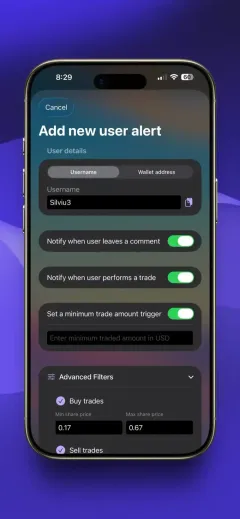
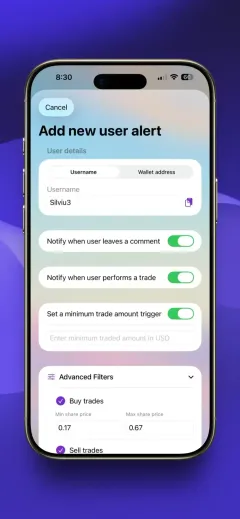
Follow any Polymarket trader by username or wallet address and get a push notification every time they trade, comment, deposit, withdraw or close a winning position.
Normal and combo trades, with an optional minimum amount so small trades stay quiet.
Comments, deposits and withdrawals, so you see what a trader says and when they add or pull funds.
Know when a tracked position resolves, with an optional minimum payout or position size.
Add a trader to your watchlist to see PnL by day, week, month or all time, volume, rank, win rate and open positions.
Browse any account’s past trades, filtered by side and minimum amount.
Find wallets worth following in Discover and the Hot Wallets leaderboard, by PnL or volume and by category.
Options and filters


Every trade on Polymarket is public. The wallet tracker turns that activity into push notifications for the specific traders you care about. People use it to follow well-known traders, to keep an eye on a wallet that took the other side of their position, to study how top performers trade a category, or to follow up on a wallet first spotted by a whale alert or an insider alert.
Not every trader needs a notification. Add them to your watchlist instead and check their PnL, volume, rank, open positions and full trade history whenever you want.
Our guide on how to track Polymarket wallets and usernames covers what trade and comment alerts are each good for and how to avoid drowning in notifications. Polymarket Alerts does not place trades or hold funds.
In Polymarket Alerts tap Add Alert, choose User alert and enter the trader’s Polymarket username or wallet address (0x…). Pick which activity should notify you, such as trades, comments or won and lost positions, and save.
Yes. A user alert sends a push notification for every normal or combo trade the wallet makes. You can set a minimum trade amount so small trades are ignored.
Yes. Add the trader to your watchlist to see profit and loss by day, week, month or all time, plus volume, leaderboard rank, win rate, realized and unrealized PnL, active positions and trade history.
Use the Discover tab for today’s top traders by PnL and volume, or the Hot Wallets leaderboard, which ranks wallets by PnL or volume by day, week, month or all time and by category.
Polymarket Alerts does not place trades for you. It tells you, within seconds, what a wallet did, with a link straight to the market, so you can decide for yourself whether to act.
Yes. Turn on won and lost position alerts to hear when a tracked position resolves, with an optional minimum payout or position size.
Keep Polymarket traders, markets, whole events and open interest in one list, without a single notification. Check any wallet’s PnL, rank and positions, and find the top traders by PnL or volume.
Learn more →Get a push notification the moment someone places a large trade on Polymarket. Set your own USD threshold, watch every market or just one, and catch wallets quietly building big positions.
Learn more →Get notified when a fresh, barely used or long-dormant wallet suddenly places a large bet on Polymarket. Unusual wallets like these are often the earliest public sign that someone may know something.
Learn more →Free on iOS and Android. Set up your first alert in seconds.

